Can the internet reach mail?
Start with the edge
Public SMTP and protocol checks show whether the relay is reachable and presenting the expected TLS identity.
Internet mail lands on a small cloud relay with a stable public address. That relay filters the connection and forwards accepted messages over a private mesh network to the mailbox server in the lab. Mail clients use the same private path through TLS passthrough, while webmail arrives through the platform’s identity-protected tunnel.
Outbound mail takes the reverse path. The mailbox server sends through the relay, and the relay uses one authorized public address to reach a delivery provider. Active Directory supplies mailbox identity over encrypted LDAP, Entra supplies web sign-in, and the public dashboard measures the complete route without exposing addresses or message data.
Built from the current mail-flow architecture, hardening playbooks, identity rotation path, relay monitoring, delivery scripts, and public mail dashboard wiring.
A mail server must accept connections from arbitrary mail systems on the internet. My home connection is the wrong place to terminate that traffic. Its address can change, residential reputation is poor, and an outage or firewall change would directly affect delivery.
The cloud edge gives the domain a stable MX destination. MX is the DNS record that tells other mail systems where incoming messages should go. The edge runs Postfix and postscreen. Postfix speaks SMTP and routes messages. Postscreen rejects obviously abusive connections before they consume the heavier mail-processing path.
The edge does not own mailboxes. Accepted mail crosses a private mesh network to the on-premises backend. The backend stores messages, authenticates users, runs the content filter, and serves IMAP and submission. Splitting the roles keeps public connection handling away from mailbox storage and directory credentials.
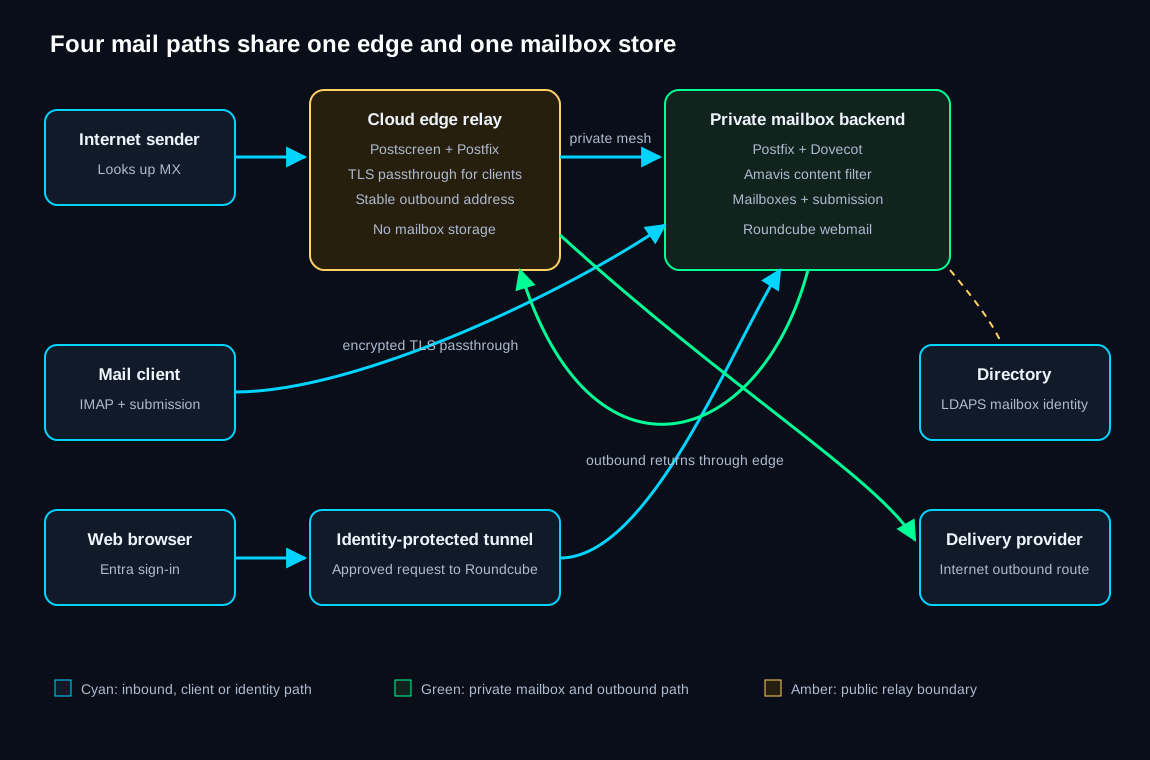
The private transport avoids a public inbound rule to the mailbox backend. TLS continues across the path, and the edge is configured around forwarding rather than becoming a second message store.
A browser or mail client submits an authenticated message to the backend. The backend sends it to the cloud relay over the private mesh. The relay then authenticates to the outbound delivery provider using a credential from Vault.
The provider is configured to accept the relay’s public address. That keeps the sending identity stable even when the home internet address changes. It also puts delivery reputation and feedback handling on a service built for internet mail, while mailbox storage and user identity remain self-hosted.
Phones and desktop clients connect to the public edge for IMAP and secure submission. HAProxy on the edge passes those encrypted connections through to the backend without terminating TLS. The client therefore verifies the certificate presented by the mailbox server, and the edge never sees the decrypted mailbox session.
That detail narrows the cloud relay’s trust. It can see connection metadata and route encrypted bytes, but it does not receive the mailbox password or message content from an IMAP session.
Roundcube follows a different browser path. Cloudflare Access performs Entra sign-in, the outbound tunnel carries the allowed request to the webmail proxy, and Roundcube opens the user’s mailbox on the backend. The application secret used in the OpenID Connect exchange is stored and rotated through Vault.
The mail backend authenticates against Active Directory using LDAPS, which is LDAP inside TLS. A trusted internal certificate authority lets the mail host verify the directory server before it sends credentials.
The configuration uses implicit LDAPS on its dedicated port. An early setting attempted StartTLS on that already encrypted port, which fails because the client and server disagree about how TLS begins. The corrected path starts encrypted from the first byte.
The public mail domain is also a directory sign-in suffix and a verified Entra domain. That lets the mailbox address, directory sign-in, and web identity line up. Account provisioning creates the directory identity and required group state; the mail server derives mailbox access from that identity without a separate account database.
The Entra application credential behind webmail is registered in the credential lifecycle system. The rotator creates a replacement, updates Vault, invokes a narrowly scoped host helper to update Roundcube, reloads the affected service, and runs a fresh Microsoft login. The predecessor remains during overlap and is retired only after revalidation.
SPF is a DNS policy that names the systems allowed to send for the domain. It helps the receiver decide whether the connecting server belongs to the claimed envelope domain.
DKIM signs selected message headers and content with a private key. DNS publishes the corresponding public key. A receiver can verify that the signed parts were not changed after the message left the authorized signer.
DMARC requires alignment between the visible From domain and the domain authenticated by SPF or DKIM. It also publishes the handling policy and creates a reporting path for failures.
| Signal | What it answers | What it cannot answer alone |
|---|---|---|
| SPF | Was this connecting sender authorized for the envelope domain? | Whether the visible From address aligns or the message changed later. |
| DKIM | Does the message carry a valid signature from the signing domain? | Whether that signing domain matches what the reader sees. |
| DMARC | Does the visible domain align with a passing SPF or DKIM result? | Whether the message content is desirable or safe. |
| Amavis | Does the backend content policy accept or quarantine the message? | Whether the internet sender is authorized to represent its domain. |
The public mail dashboard combines edge availability, backend mail protocols, queue state, delivery outcomes, content-filter state, webmail reachability, and certificate expiry. Recipient addresses, subjects, message bodies, account names, and internal routing labels remain private.
A page check alone would be weak evidence. Roundcube can load while SMTP delivery is stuck. Postfix can accept mail while the private forwarding path is broken. The dashboard separates those stages so the failing owner is visible.
The certificate path is also split. The public relay and webmail names use Let’s Encrypt. Directory connections rely on the internal authority. Blackbox checks read the certificate actually served on each network path.
Live public Grafana view
Open full screenChecking the live mail dashboard.
The live mail dashboard is unavailable. The mail-platform write-up remains online, and it does not present stale delivery state as current.
Can the internet reach mail?
Public SMTP and protocol checks show whether the relay is reachable and presenting the expected TLS identity.
Is mail moving inward?
A healthy edge beside an unhealthy backend points to the private forwarding path or mailbox service.
Is outbound mail delayed?
Queue growth and delivery results separate submission from the provider handoff.
Can a user read mail?
Protocol checks and the signed-in application route cover different client paths to the same mailbox.
| When | What runs | What a quiet result means |
|---|---|---|
| On inbound connection | Edge filtering and Postfix routing evaluate the sender and recipient domain. | Accepted mail crosses the private path to the backend. |
| On outbound submission | The backend authenticates the user and relays through the cloud edge. | The delivery provider accepted the authorized handoff. |
| On webmail sign-in | Edge access and Entra identify the user; Roundcube opens the matching mailbox. | The browser identity and mailbox path both work. |
| On directory login | The backend verifies Active Directory over LDAPS. | No separate mailbox password is needed. |
| Continuously | Monitoring checks protocols, queues, services, certificates, and public reachability. | Each stage is producing current evidence. |
| On credential rotation | The registered worker updates Vault and Roundcube, reloads, and performs a fresh login. | The replacement is active; the predecessor remains through overlap. |
An operational verification observed Amavis quarantine behavior and no Rspamd verdicts in the live mail log. The architecture record was corrected. This page names Amavis because it is the component making the backend content decision.
The backend attempted to negotiate StartTLS on a port that expects TLS immediately. Directory authentication failed until the connection mode matched the server.
The cloud relay separates public transport from mailbox storage, but each role currently has one active instance. A managed backup MX and a rebuilt, code-owned relay path are the next steps if mail becomes load-bearing.
The relay is documented and monitored, but the complete cloud-host provisioning manifest is still being brought under the same repository-controlled rebuild standard as the rest of the lab.